Plan mode in Claude Code, and why DispatchSEO's Semi-automatic projects use the same idea
7 min read
On this page
Press Shift-Tab twice in a running session and Claude Code drops into a mode where it can read every file and run any read-only command, but it will not touch your source until you say so - it researches, writes a plan, and stops there until you approve it.
TL;DR - Plan mode blocks edits and most shell commands until you approve a plan Claude proposes after reading the codebase. Enter it with
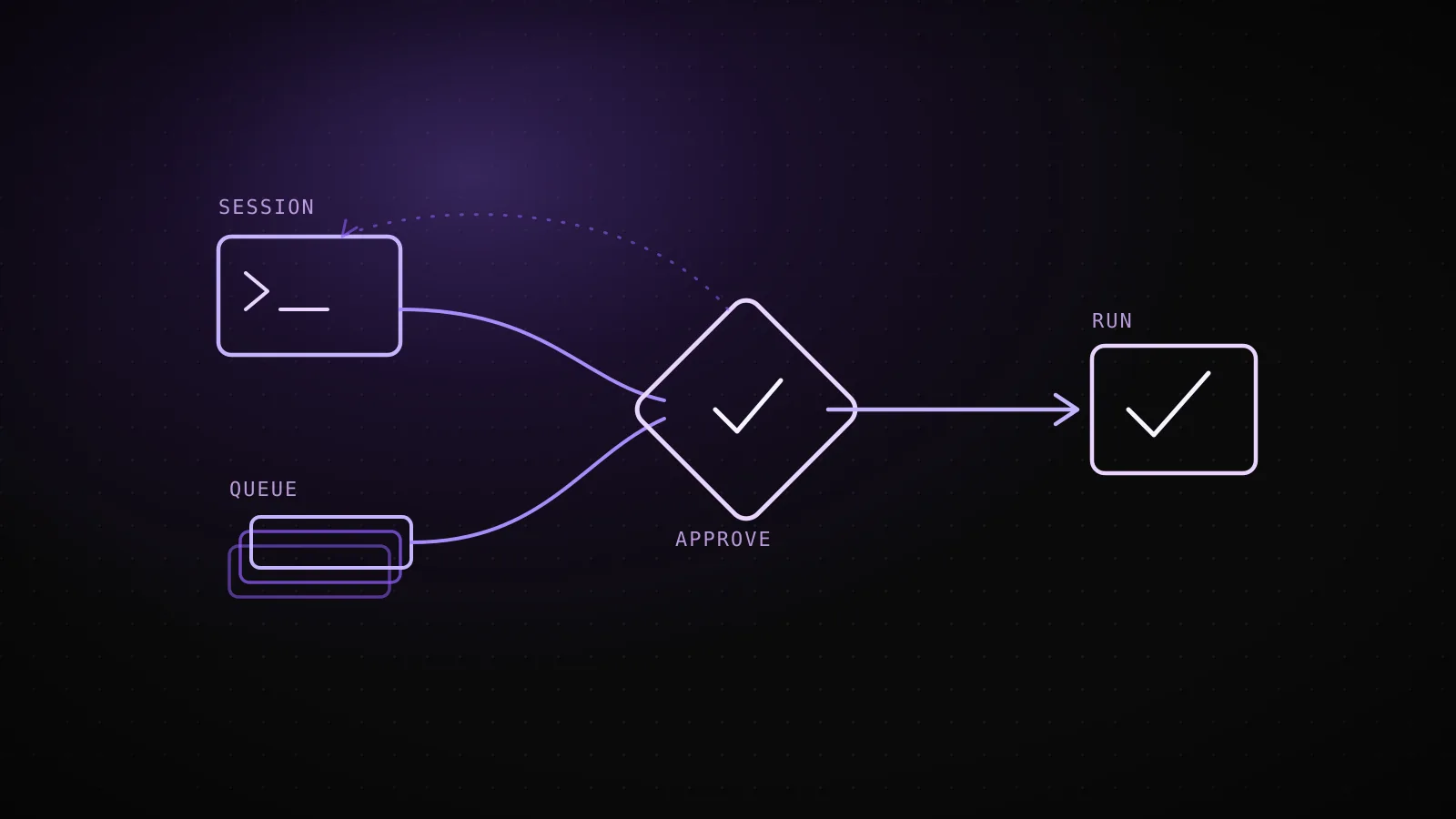
Shift-Tab,/plan, orclaude --permission-mode plan; approve with "yes, start editing" (or "yes, and clear context"), or send it back with "no, keep planning."Ctrl+Gopens the plan in your editor first. DispatchSEO's own Semi-automatic project mode runs the identical trade one layer up: an agent proposes a suggestion, and it sits pending until the site owner approves it on the dashboard - propose, then a human decides, before anything ships either way.
What plan mode actually does before Claude touches a single file
Plan mode is a permission mode, not a separate product - the same session, with one rule changed: reads and read-only shell commands run freely, but Claude cannot write a file until a plan is approved. That's the entire mechanic. It's not a lower-capability mode or a "safe" sandbox with a smaller toolset; it's a full-context session that has agreed to hold off on the one category of action - an edit - that a plan is supposed to review first.
- 1
Manual mode (the default)
every edit and most shell commands ask first, one at a time
- 2
Shift-Tab once - Accept edits
edits run without asking; shell commands can still prompt
- 3
Shift-Tab again - Plan mode
Claude reads files and runs read-only commands, but no edit reaches disk yet
- 4
Claude presents the finished plan
three answers: start editing now, start editing and clear the planning context, or keep planning
- 5
Approving exits plan mode
the session switches to whichever mode that answer implies, and the edits begin - Ctrl+G opens the plan in your editor first if you want to change it by hand
Shift-Tab cycles a running session through the permission modes - manual, accept-edits, plan, then back to manual - and pressing it twice from manual lands you in plan. Prefixing a single prompt with /plan, or starting the CLI with claude --permission-mode plan, does the same thing without the keypresses. Once Claude finishes exploring and drafts a plan, it stops and asks.
Entering it, approving it, and the one keystroke that edits the plan itself
The approval prompt gives three answers, and each one does something different: yes, start editing exits plan mode and runs the plan's edits in the same session; yes, and clear context first does the same but drops the planning transcript, which the current docs call out as an opt-in setting (showClearContextOnPlanAccept) rather than a default; no, keep planning stays in plan mode so you can redirect it, nothing written yet either way. Ctrl+G opens the plan in your default text editor so you can rewrite it by hand before choosing - not just approve or reject, but edit the actual plan Claude is about to execute.
To confirm none of that had drifted from what's documented, this build ran claude --help against the exact Claude Code CLI executing this guide (v2.1.251) and read back the accepted values for --permission-mode: acceptEdits, auto, bypassPermissions, manual, dontAsk, plan - six modes, not the four most walkthroughs still name. The current docs also note a real behavior change worth knowing if you're reading an older writeup: with auto mode's classifier available during planning, shell commands outside the read-only set get reviewed by the classifier instead of prompting you - versions 2.1.212 through 2.1.217 prompted for every one of them regardless, so a plan-mode session from that window felt chattier than one running today.
DispatchSEO's Semi-automatic projects run the identical trade at the queue level
Plan mode gates one session's edits behind one person's yes. This project's own Semi-automatic mode gates a whole content queue behind the same kind of yes, just moved from a terminal prompt to a dashboard. An agent researching keywords or drafting a guide can propose a suggestion any time, but on a Semi-automatic project the agent's own approval only records as pending - the owner is the one who actually moves it to approved, exactly the way "no, keep planning" leaves an edit unrun until a person says otherwise.
- blocked until yes
- Edits to any file, most shell commands
- what yes unlocks
- The plan's edits start running in that same session
- blocked until yes
- The agent's own suggestion-queue approval
- what yes unlocks
- The build runs and opens a pull request
This specific guide is a case of the other setting: this project runs in Auto mode, where suggestions inside the auto-approve zone (like this one - keyword difficulty 3, comfortably under the threshold) get approved without waiting on the dashboard, the same way acceptEdits lets Claude write files without a plan first. Same underlying mechanism, two different defaults for how much of it a human has to touch.
When the review step earns its keep, and when it's just friction
The blast radius is hard to undo
A schema migration, a force-push, a delete across many files - the kind of action plan mode's edit block and a dashboard's pending queue both exist to catch before it runs, not after.
Nobody is watching the session in real time
A scheduled build with no one at the terminal - the exact case DispatchSEO's Semi-automatic mode targets, where a bad call would otherwise ship unseen until the PR lands.
The agent is inside conventions it doesn't already know
An unfamiliar repo or a first pass at a new content type - plan mode's read-then-propose order matches how a careful engineer would approach the same unfamiliar code.
Approval and rejection genuinely lead somewhere different
If the answer is always yes, the pause is just a click. It earns its keep when "no, keep planning" or a pending suggestion would actually change what happens next.
The flip side matters as much as the list above. A well-scoped build that already passed its own quality gates - a keyword under the auto-approve threshold, a page that already cleared the sameness and thin-content checks before a line of prose was written - doesn't get safer for adding a pause with nothing left to catch. That's the case Auto mode and acceptEdits are for: the review already happened, just earlier and in a different form, so asking again is a click that changes nothing. The pause is worth its cost exactly when the checklist above is true and not a moment longer than that.
Where the analogy breaks: a plan you edit vs. a PR you merge
The mapping holds for the propose-then-approve shape, not for what happens on either side of it. Plan mode's "no, keep planning" is a live conversation - you redirect Claude and it drafts again in the same session, seconds later. A pending DispatchSEO suggestion has no equivalent back-and-forth; the owner approves, rejects, or leaves it, and a rejected idea doesn't get automatically retried with feedback baked in. And the artifact under review differs in kind: Ctrl+G lets you rewrite Claude's plan line by line before a single edit runs, while what a DispatchSEO owner reviews is a finished, mergeable pull request - the content pipeline's own house rule, in fact, is that the dashboard reviews the PR a scheduled agent run opens, not the idea behind it, so there's no equivalent of editing the "plan" for a guide once the queue has approved it. Same instinct - hold action for a human decision - built at two different grains.
Both mechanics exist for the same reason a PreToolUse hook or a Bash sandbox boundary does: once an agent runs without someone watching every step, the safety has to come from something that doesn't depend on the model choosing correctly. Plan mode makes that concrete for one session's edits; a Semi-automatic queue makes it concrete for everything a coding agent ships to a live site.
FAQ
Does plan mode stop Claude from running any commands at all?
No. Read-only exploration - reading files, running commands like git log or ls - runs freely. What's blocked is edits, plus shell commands outside the built-in read-only set, which either go to the auto-mode classifier or prompt you, depending on your settings.
Is plan mode the same thing as --dangerously-skip-permissions, just inverted?
No - they're opposite ends of the same axis, not mirrors. Skip-permissions removes the approval step entirely, including in a plan-mode session running with bypass permissions available. Plan mode adds one specific approval step (the plan itself) on top of whatever permission mode you'd otherwise be in.
Can I actually change what a plan says before approving it?
Yes. Ctrl+G opens the proposed plan in your default text editor, and you can edit it directly before Claude proceeds - not just approve or send it back verbally.
Does DispatchSEO's Semi-automatic mode let an agent "keep planning" on a rejected suggestion the way plan mode does? No - that's the analogy's actual seam. A rejected or pending suggestion doesn't get an automatic redo with your feedback attached; the owner's decision stands until someone revisits it by hand on the dashboard.
Which mode does dispatchseo.com itself run on?
Auto - this guide's own suggestion cleared the auto-approve zone and built without waiting on a dashboard click, the acceptEdits side of the same trade this article maps.
Plan mode's whole value is timing: the review happens before an edit exists, not after. Whether that review runs in a terminal over one session or across a content queue over a whole project, the shape - propose, then let a human decide, before anything ships - is the same trade, made at whatever grain the risk actually calls for.