Claude Code checkpoints: the undo button for an agent that just made 40 file changes unattended
8 min read
On this page
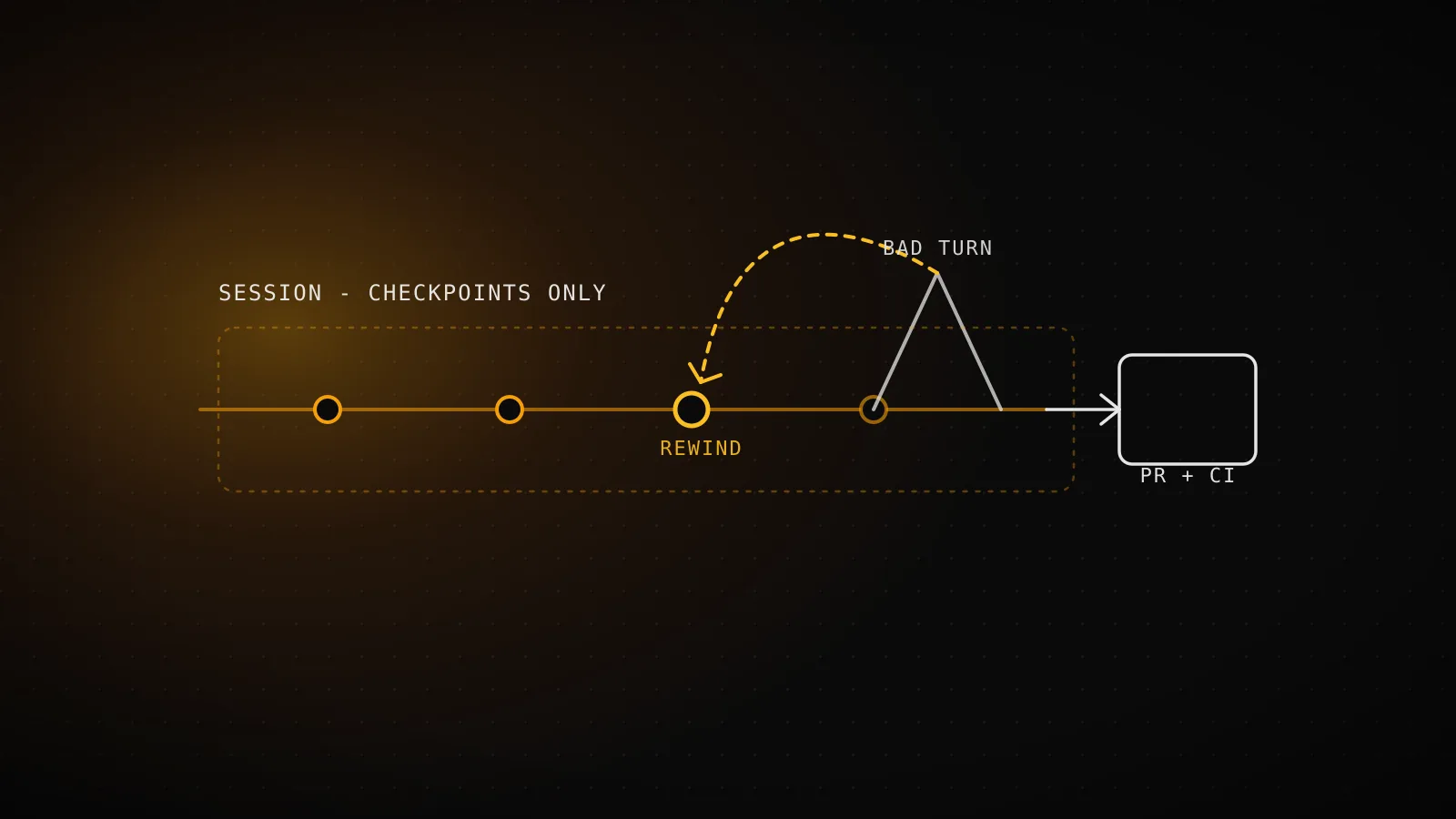
Claude Code checkpoints save a snapshot of every file its Write, Edit, and NotebookEdit tools touch before each prompt you send, so pressing Esc twice on an empty prompt - or running /rewind - lets you undo a bad turn back to any earlier point in the session: the code, the conversation, or both. They don't touch anything a Bash command changed, most of what a subagent edited, or anything outside the session that created them, and Anthropic's own docs say plainly that checkpoints aren't a replacement for version control.
TL;DR - Claude Code takes a file snapshot before every prompt and keeps the 100 most recent per session (30-day default retention).
Esc Escon an empty prompt, or/rewind, opens a menu to restore code, restore conversation, restore both, or compress the session from a chosen point. What it never restores: files a Bash command changed, most subagent edits, anything outside the session, symlinked or hard-linked paths, or a deleted/moved directory. The docs are explicit that this is session-level recovery, not version control - git still does the permanent part. A separate, programmatic mechanism (enableFileCheckpointingin the Agent SDK, or--rewind-fileson the bare CLI) exists for headless use, but it has to be wired in on purpose; a plain-prun gets none of it for free, which this guide checks against this project's own daily builder below.
What actually gets checkpointed, and when
Every user prompt starts a new checkpoint. Before that turn's edits land, Claude Code snapshots the files its own editing tools are about to touch, then keeps going - it does not ask, and there's no toggle for "checkpoint this turn but not that one." The tracking is automatic and per-session: checkpoints are saved with the conversation itself, so /rewind still works after you resume a session later, not just inside the run where the changes happened.
A checkpoint is created
Every prompt
one snapshot per user message, taken before that turn's edits land
Kept per session
100
the 100 most recent checkpoints - older ones are discarded
Default retention
30 days
deleted with the session; change it via cleanupPeriodDays
Two limits shape how far back you can actually go. Only the 100 most recent checkpoints survive in a session - discarding an older one deletes the snapshot files nothing else still references, except each file's very first snapshot, which the VS Code extension keeps as its session-diff baseline. And by default the whole session, checkpoints included, is deleted 30 days after it ends; cleanupPeriodDays in settings moves that number if 30 days is wrong for how you work.
The five things the /rewind menu can do once you're in it
/rewind, or Esc Esc when the prompt box is empty, opens a menu listing every prompt sent in the session. Pick one, then choose:
- Restore code and conversation - revert both to that point
- Restore conversation - rewind the messages, leave the current files alone
- Restore code - revert the files, keep the conversation as it is
- Summarize from here - compress everything after this point into a summary, freeing context
- Summarize up to here - compress everything before this point, leaving later messages intact
The two code-restore options only appear when the checkpoint you picked actually has tracked file changes to revert - if nothing got edited after that point, the menu quietly drops to conversation-only options. Summarizing never touches a file on disk; you can steer what it focuses on by typing a line of context into the row before pressing Enter, or hit the number key to summarize immediately with no steering at all.
If you ran /clear earlier in the same process, the menu adds one more entry above the list: /resume <session-id> (previous session), which reopens the conversation /clear erased - useful for the specific mistake of clearing too early and wanting the last checkpoint from before that happened.
What checkpoints never touch
This is the list worth reading before trusting /rewind as a full undo button, straight from the docs' own "Limitations" section:
Bash-modified files
rm, mv, cp and every other shell command bypass the tracker entirely - only Write, Edit and NotebookEdit tool calls are captured
Most subagent edits
a subagent's file changes are usually not restored; only a foreground context: fork skill's edits count as part of your own turn
Anything outside this session
manual edits you make yourself, or edits from a concurrent Claude Code session, are invisible to this session's checkpoints
Symlinked and hard-linked paths
restore skips them and prints a "skipped N files" warning - a dotfile manager's symlinks and pnpm's hard-links both land here
Directory structure
creating, moving or deleting a whole directory is not undone by rewinding - only tracked files' contents are
None of these are edge cases you'll rarely hit. rm, mv, and cp are exactly the commands an agent reaches for constantly, a background subagent doing real work is the normal shape of a delegated task rather than an exception, and a project with a dotfile manager or a pnpm install has symlinks and hard-links sitting in it right now, whether or not you've noticed.
Checkpoints vs. git: two safety nets with a real gap between them
| | Checkpoints | Git |
|---|---|---|
| Scope | Current session only | Permanent, whole-project history |
| What's protected | Write/Edit/NotebookEdit tool calls | Anything committed, however it changed |
| Survives a rm from Bash? | No - untracked | Yes, if the file was committed first |
| Survives a subagent's edit? | Usually no | Yes, if the edit gets committed |
| Undo unit | Any of the last 100 prompts | Any commit, unlimited history |
| Needs a human to invoke it? | Yes - Esc Esc or /rewind | Not necessarily - hooks and CI can gate or revert automatically |
The docs' own wording for this is direct: checkpoints are "designed for quick, session-level recovery," and for "permanent version history and collaboration" you keep using git. The gap that actually matters is the last row. /rewind is something a person does, in the moment, inside an interactive session - which is exactly the one thing an unattended pipeline doesn't have.
What backstops the agent building this exact guide
This project's own daily guide-builder is that unattended pipeline, and it's the one writing this guide right now - so rather than describe the gap abstractly, here's what the run actually has wired in.
.github/workflows/seo-daily.yml - claude_args for this exact run
--permission-mode bypassPermissions
no prompts to answer - nothing in this run waits on a human
--rewind-files <checkpoint-uuid>
the CLI flag that triggers an SDK-level file rewind
CLAUDE_CODE_ENABLE_SDK_FILE_CHECKPOINTING
the env var that turns SDK checkpointing on for a headless -p run
Read straight from this repo's own workflow file: the run building this exact guide has zero checkpoint coverage wired in.
--permission-mode bypassPermissions is there so nothing stalls waiting on an approval that no one is present to give - the same shape covered in this project's headless-mode guide. Neither of the two checkpointing-specific flags is: no --rewind-files, no CLAUDE_CODE_ENABLE_SDK_FILE_CHECKPOINTING. And even setting those aside, Esc Esc and /rewind are keyboard interactions inside a running terminal session - a claude-code-action job in GitHub Actions has no terminal for a human to press a key in, so the interactive menu was never reachable here regardless of any flag.
What actually catches a bad run instead is the same layer covered in this project's own guide to its build hooks: every change lands as a pull request, never a push straight to main, and a set of required checks has to go green before seo-auto-merge.yml merges it. That's the same shape as the sandbox's OS-level enforcement moved up a layer - not "can a bad edit happen" but "can a bad edit reach production without a second, independent check."
Reaching for the SDK's own checkpointing instead of the interactive menu
The Claude Agent SDK ships a second checkpointing mechanism that has nothing to do with the /rewind menu: set enableFileCheckpointing: true (or enable_file_checkpointing=True in Python) on a session, capture the UUID each user message carries in the response stream, and call rewindFiles() / rewind_files() with that UUID whenever you decide to revert. It restores files only - the conversation and its history are untouched by a rewind call, which is the opposite default from the interactive menu's "restore both" option.
It works headless, but not by accident. The bare CLI needs the environment variable spelled out explicitly:
CLAUDE_CODE_ENABLE_SDK_FILE_CHECKPOINTING=true claude -p --resume <session-id> --rewind-files <checkpoint-uuid>
and it carries the same blind spots as the interactive version - Bash-modified files, most subagent edits, symlinks, and directory-level changes are all still outside what a rewind call can undo. It's the right tool when a headless pipeline wants a cheap, code-level "undo the last risky step" without reaching for git, and the wrong one when the failure you're actually worried about is "a bad change reached main" - that's a merge-gate problem, and no amount of file rewinding inside a single run changes whether the PR in front of it needed a second check.
FAQ
Does /rewind undo changes a Bash command made?
No. Checkpointing only tracks files modified through the Write, Edit, and NotebookEdit tools; a rm, mv, or sed -i run through Bash is invisible to it and can't be reverted through the rewind menu.
What happens to my checkpoints if I close Claude Code and come back later?
They persist. Checkpoints are saved with the session, so /rewind still works after a resume - they're deleted only when the session itself is cleaned up, 30 days after it ends by default.
Can I use checkpoints to undo a subagent's edits?
Usually not. Rewinding restores a subagent's changes only when it ran as a foreground context: fork skill, which edits your working tree as part of your own turn. Any other subagent's edits - including a background skill run or a background /code-review --fix - need git to revert.
Is checkpointing available in headless (-p) mode?
The interactive Esc Esc and /rewind menu isn't - there's no terminal for a human to act in. The Agent SDK's separate file-checkpointing mechanism does work headless, but only if you explicitly enable it and, on the bare CLI, set CLAUDE_CODE_ENABLE_SDK_FILE_CHECKPOINTING; nothing turns it on by default.
Do checkpoints replace committing to git? No, and the docs say so directly - checkpoints are for quick, session-level recovery, not permanent version history. Anything you want to survive past the session, or collaborate on, still needs a commit.
None of this changes how this project's own daily builder runs: it never touches /rewind, because a pull request that has to pass CI before it merges is the same safety property, applied one layer up, to a process that has no one at the keyboard to press Esc twice in the first place.