Claude Code memory, mapped - what CLAUDE.md and auto memory actually do
9 min read
On this page
Claude Code remembers a project two separate ways: a CLAUDE.md file you write yourself, and auto memory - notes Claude writes into a MEMORY.md file on its own, based on your corrections and preferences, turned on by default. Both load at the start of every session, before you type a word. Neither one is the "memory tool" Anthropic ships in its API for developers building their own agents - a different product for a different audience, and the single most common mix-up in what ranks for this exact search.
TL;DR - CLAUDE.md is instructions you write; auto memory is notes Claude writes about your corrections and preferences into MEMORY.md, on by default. CLAUDE.md can live at four scopes - managed policy, user (
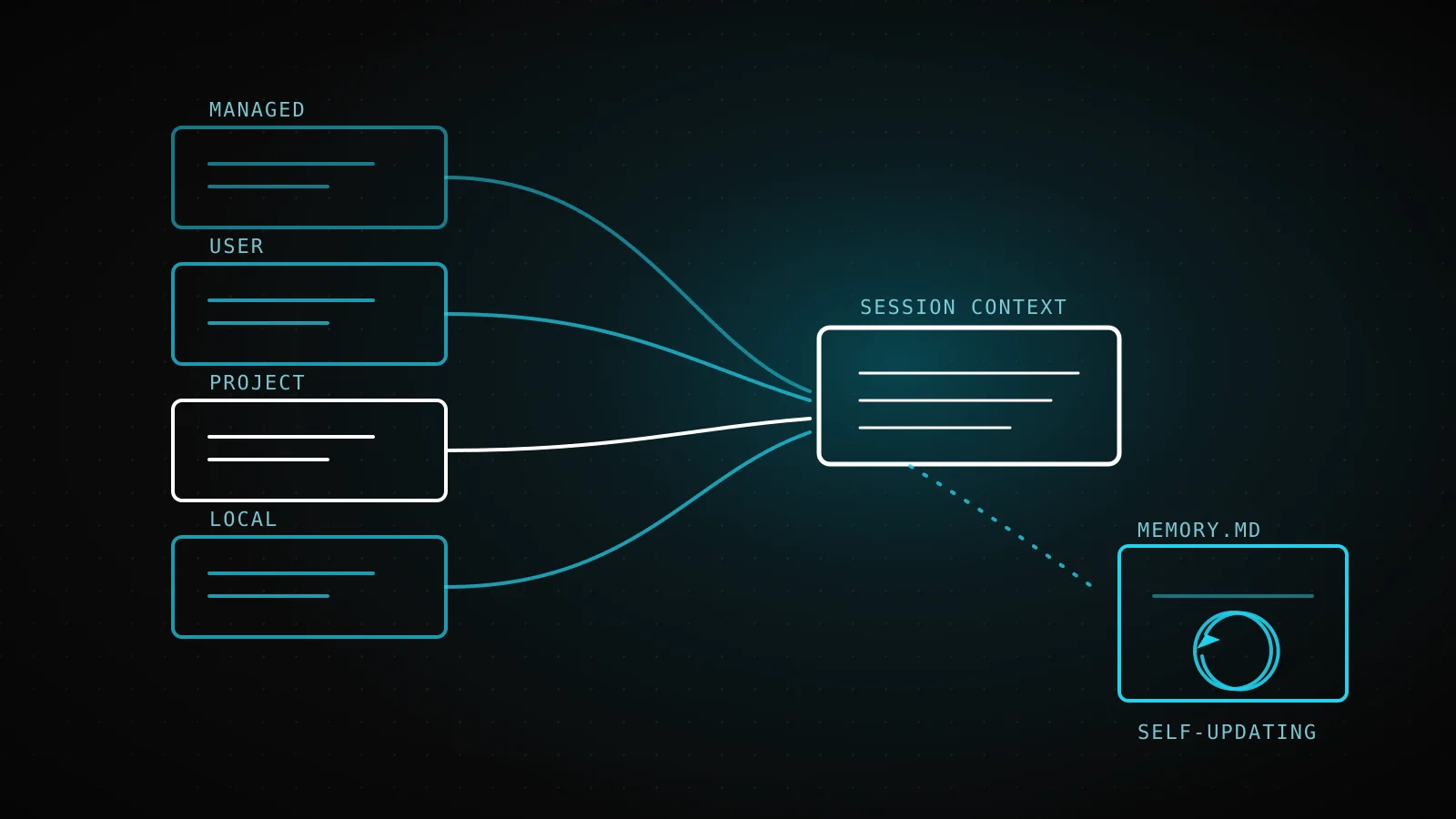
~/.claude/CLAUDE.md), project (./CLAUDE.md), and local (./CLAUDE.local.md, gitignored) - loaded broadest first, then concatenated rather than overridden. Auto memory lives per repository at~/.claude/projects/<project>/memory/, and only the first 200 lines or 25KB of itsMEMORY.mdindex load at session start - everything past that waits until Claude reads it on demand. Neither is the Claude Platform API's separate memory tool, built for developers writing their own agents against the Messages API. This site's own root CLAUDE.md - the file every automated guide-build session reads before doing anything else - runs 207 lines, seven over Claude Code's own 200-line guidance for reliable adherence.
Two mechanisms, not one
The distinction that matters most: who's holding the pen. CLAUDE.md is instructions you write - coding standards, architecture notes, "always do X" rules - loaded in full, every session, the same way regardless of who's asking. Auto memory is the opposite direction: Claude decides what's worth keeping as it works, based on corrections you give it and patterns it notices, and writes that down without you opening an editor. Both get loaded into context at the start of every conversation; neither is enforced configuration. Claude treats both as things to follow, not rules it's mechanically blocked from breaking - for a hard "never allow this" boundary, that's a job for a permissions setting or a hook, not either memory file.
Where a CLAUDE.md file actually lives
| Scope | Location | Purpose | Shared with |
|---|---|---|---|
| Managed policy | /etc/claude-code/CLAUDE.md (Linux/WSL) | Org-wide rules pushed by IT/DevOps | Every user on the machine - can't be excluded |
| User | ~/.claude/CLAUDE.md | Your personal preferences, every project | Just you, all projects |
| Project | ./CLAUDE.md or ./.claude/CLAUDE.md | Team-shared architecture and conventions | The team, via version control |
| Local | ./CLAUDE.local.md | Your own sandbox URLs, personal test data | Just you, this project - gitignored |
The order in that table is also the load order - broadest scope first, most specific last - and every file at every applicable scope gets concatenated into context rather than the narrowest one winning outright. A project instruction is read after a user instruction, so it can refine or add to it without needing to repeat it. The one entry with no opt-out: a managed-policy CLAUDE.md, pushed by MDM or Ansible to every machine in an org, can't be excluded by any individual setting. In a large monorepo where an ancestor CLAUDE.md belongs to a different team, a claudeMdExcludes pattern in your own settings skips it without touching the file itself.
What loads at launch, and what waits
Claude Code finds project and local CLAUDE.md files by walking up the directory tree from wherever you started the session, loading everything it finds along the way in full. Files that live in subdirectories under your working directory are different - those load on demand, the moment Claude reads a file in that subdirectory, not at launch. A CLAUDE.md can also pull in other files with @path/to/file syntax; imports expand and load at launch too, up to four hops of recursion, and wrapping a path in backticks (`@README`) keeps it literal instead of importing it. For instructions that only matter for specific files, .claude/rules/*.md with a paths: frontmatter field scopes them to a glob pattern instead of loading on every session regardless of what you're touching.
Auto memory: the part you don't write
Auto memory is on by default; toggling it lives in /memory inside a session, or autoMemoryEnabled: false in a project's .claude/settings.json to disable it for just that repo. What actually gets stored: each git repository gets one memory directory at ~/.claude/projects/<project>/memory/, shared across every worktree of that repo, containing a MEMORY.md index plus whatever topic files Claude creates - debugging.md, api-conventions.md, anything it decides is worth splitting out. Only MEMORY.md's first 200 lines or 25KB load automatically at session start; topic files load on demand, the same way nested CLAUDE.md files do. Go over that limit and the write still succeeds, but Claude Code flags it - because everything past the cutoff simply won't be there next session. None of it leaves the machine it was written on: no sync across devices, nothing shared with teammates - a single-machine notebook, not a team knowledge base.
The one thing that isn't Claude Code at all
CLAUDE.md
You write it
Instructions and rules, loaded in full every session. Lives in a Claude Code project, checked into git.
Auto memory
Claude writes it
Notes on your corrections and preferences, saved to MEMORY.md. On by default, no CLAUDE.md editing required.
Subagent memory
One subagent writes it
Opt-in per subagent via the memory frontmatter field - scoped to that subagent, invisible to the main session.
Platform memory tool
Your own app code writes it
A Claude API tool-use feature for apps you build against the Messages API. Not part of Claude Code at all.
Two of those four live inside the coding CLI everyone means when they say "Claude Code memory." The third - a subagent's own memory frontmatter field - is scoped to one subagent and invisible to the session that spawned it; the fuller mechanics of that field, including why a subagent is stateless without it, are covered separately rather than repeated here. The fourth is the one that actually shows up on page one for this search and has nothing to do with any of the above: the Claude Platform's memory tool is a feature for developers building their own agents against the Messages API, unrelated to anything a Claude Code user configures.
What this repo's own CLAUDE.md actually looks like
This repo's root CLAUDE.md
207 lines
wc -l CLAUDE.md, run for this guide - 10 top-level sections, 12,075 bytes
Claude Code's own adherence guidance
200 lines
the docs' target ceiling before instructions get followed less reliably
A second always-loaded file, same repo
90 lines
.dispatchseo/conventions.md - site facts read by the SEO workflow, layered above CLAUDE.md
That 207-line number is dispatchseo.com's own project CLAUDE.md, measured with wc -l while writing this exact guide - real, not a stand-in. It runs over Claude Code's own 200-line guidance because the repo genuinely has that much a session needs before touching anything: which of three entry points resolves "the tenant" for a given request, why crons split across two schedulers because of a Vercel Hobby cap, which migrations need a Postgres-compatibility guard. Trimming it to fit the guideline would mean a session rediscovering one of those the expensive way - through a bug - instead of reading it once. The honest tradeoff the docs describe (shorter files get followed more reliably) is real, and this file accepts a small hit to adherence in exchange for not re-deriving load-bearing facts every session.
The same repo runs a second always-loaded file for a completely different reader: .dispatchseo/conventions.md, fetched over MCP by the SEO workflow rather than read as CLAUDE.md, holding voice rules and content contracts a coding session doesn't need and an SEO-drafting session can't work without. Same pattern - a durable file read fresh at the start of a job - aimed at two different audiences inside one repo. Neither file is the durable state that actually survives between this site's own scheduled runs, though; that's a Supabase-backed queue read and written over its own MCP server, a different kind of memory than anything covered above and the subject of its own guide.
Why Claude ignores your CLAUDE.md sometimes
Run /context in a session and check the Memory files list - if a CLAUDE.md you expect isn't there, Claude never saw it, and everything else is moot. If it's loaded but not being followed, the usual cause is phrasing: "use 2-space indentation" gets followed more reliably than "format code properly," because the first is something Claude can check itself against and the second isn't. Conflicting instructions across scopes are the other common cause - two CLAUDE.md files giving different guidance for the same situation leaves Claude picking one arbitrarily, which is worth an occasional read-through to catch. None of this changes for a headless run: a scheduled claude -p session - the pattern this site's own daily guide builder uses - loads CLAUDE.md exactly the same way an interactive one does, with nobody there to notice if it didn't. One more wrinkle worth knowing: after /compact, the project-root CLAUDE.md gets re-read from disk and re-injected automatically; a nested CLAUDE.md in a subdirectory doesn't reload until Claude next touches a file down there.
When CLAUDE.md is the wrong tool
CLAUDE.md is context, not enforcement - Claude reads it and tries to follow it, but nothing stops a large or ambiguous instruction from occasionally getting missed. A rule that has to hold every time, no exceptions ("never touch the payments table," "always run this before committing"), belongs in a hook or a permissions setting instead, where it's checked mechanically rather than read and interpreted. A multi-step procedure that only applies to one kind of task doesn't belong in CLAUDE.md either - loaded on every session whether relevant or not, it's better as a skill Claude reaches for when the task actually calls for it. And auto memory specifically isn't a substitute for state that has to outlive the machine it runs on or be visible to a different session: it's local to one machine, which is exactly wrong for anything a team needs to share or a scheduled job needs a cold start to see.
FAQ
What's the actual difference between CLAUDE.md and auto memory? You write CLAUDE.md by hand - instructions and rules. Claude writes auto memory itself, saving notes on your corrections and preferences to a MEMORY.md file, on by default with no editing required from you.
Does CLAUDE.md load the same way in a headless or CI run?
Yes. A scheduled claude -p session loads CLAUDE.md exactly like an interactive one, at the start of every session regardless of whether a human is watching.
Is the "memory tool" the same thing as Claude Code's memory? No. That's a separate Claude Platform API feature for developers building their own agents against the Messages API - it has no connection to CLAUDE.md, auto memory, or anything a Claude Code user configures.
Why does my CLAUDE.md seem to get ignored?
Run /context first to confirm it actually loaded. If it did, the usual fix is making instructions more specific and checkable, and removing conflicting guidance across scopes - Claude treats CLAUDE.md as context to follow, not configuration it's mechanically bound to.
Can auto memory be turned off?
Yes - toggle it from /memory inside a session, set autoMemoryEnabled: false in a project's settings to disable it there specifically, or set CLAUDE_CODE_DISABLE_AUTO_MEMORY=1 as an environment variable.
CLAUDE.md and auto memory solve different problems with the same delivery mechanism: both get read into context before you type anything, and both stop mattering the moment they're wrong or stale. The four-scope table above is the part worth bookmarking; the more useful habit is the one this repo's own 207-line file forces on every automated run that reads it - treat it as a document that has to earn its length, not a place to accumulate everything a session might someday need.