What actually happens when Claude Code hits a rate limit
8 min read
On this page
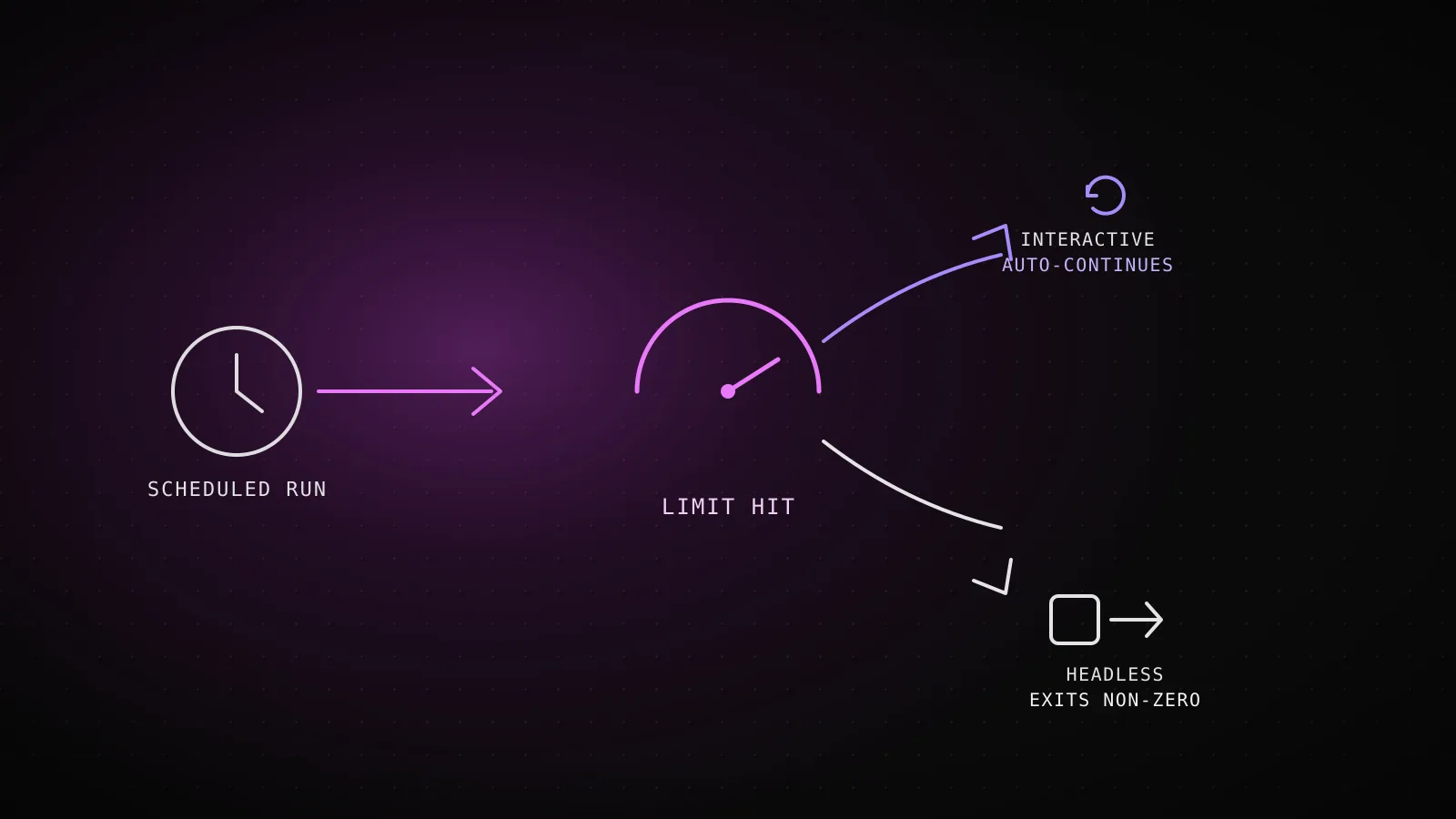
Hit a rate limit inside an interactive Claude Code session and the CLI can wait it out on its own, as of v2.1.234. Hit the same limit inside a scheduled claude -p run - a GitHub Actions cron, a self-hosted builder, anything nobody is watching - and nothing waits: the process just exits, and whatever triggered it has to notice and decide what to do next. Which limit you hit changes the fix, too - a monthly spend cap, a subscription's session window, and a model-specific ceiling clear on three different clocks, and only one of them responds to switching models.
TL;DR - "Rate limit" covers four different things: API requests-per-minute (429,
retry-afterheader), a subscription's session/weekly usage window ("You've hit your session limit"), a model-specific Opus/Sonnet ceiling (switching models with/modelgets you working again), and a monthly spend cap (nothing helps until the calendar turns over). Interactive sessions on v2.1.234+ can wait and auto-continue; headless (-p) runs have no documented auto-wait, so the process exits non-zero and a caller has to grep the failure text.--output-format stream-jsonemits asystem/api_retryevent with anerror: "rate_limit"category for exactly that. This project's own scheduler treats a quota hit as "come back later," not "broken" - it never widens the retry window past 2 hours the way a genuinely broken run does, because a usage window resets on a clock, not on how many times you've already failed.
Four limits share one word, and only two respond to switching models
API rate limit
Console/API keys, per organization
HTTP 429, error type rate_limit_error, with a retry-after header
Unblocks with: Wait out retry-after, or raise the org's RPM/ITPM/OTPM tier
Session or weekly limit
Pro/Max/Team/Enterprise subscribers
"You've hit your session limit · resets 3:45pm" (or weekly)
Unblocks with: Nothing but time - shared across every model, switching with /model does not help
Opus or Sonnet limit
Subscribers, model-family specific
"You've hit your Opus limit · resets 3:45pm"
Unblocks with: Switch to a model outside that family with /model and keep working
Monthly spend cap
Console/API organizations
HTTP 429 with error_code enforced_spend_limit_reached, no retry-after
Unblocks with: Nothing until 00:00 UTC next month, or raise the cap in Billing
The API's rate limit - requests, input tokens, and output tokens per minute, enforced with a token bucket that refills continuously rather than resetting on a fixed clock - only applies to Console/API-key traffic, and it's the one with an actual retry-after header telling you how many seconds to wait. A subscription's session and weekly limits are a completely different mechanism: a seat-based allowance shared across every model, so /model does nothing for it. Only the model-specific "You've hit your Opus limit" or "You've hit your Sonnet limit" message responds to switching - move to a model outside that family and you keep working. A monthly spend cap is the fourth kind, and the one worth reading twice: it returns the same rate_limit_error error type as an ordinary 429, but with error.details.error_code: "enforced_spend_limit_reached" and no retry-after header at all, because there is nothing to retry until the calendar turns over.
What actually happens the moment the limit hits
Interactive session
- v2.1.234+ waits and continues automatically on a claude.ai subscription login - a status line reads
Usage limit reached · continuing automatically at 3:45pm · esc to cancel - The in-progress turn is preserved, not restarted - it resumes from where it stopped once the window resets
- Esc at an empty prompt cancels the wait, or use
/rate-limit-options
Headless / -p / CI
- No documented auto-wait. Current docs describe the interactive behavior only - a scripted run has no terminal to show a countdown to
- The process exits non-zerolike any other run failure, per the CLI's own contract: exit 0 on success, non-zero when the run fails
- The failure text carries the signal- the same "session limit"/"usage limit" wording, printed to stdout as the result, for a caller to grep
The gap between those two columns is the whole reason this matters for anything running unattended. In an interactive session, Claude Code shows a countdown and picks the turn back up once the window clears - genuinely resumed, not restarted, so nothing about the conversation is lost. In a -p/headless run, none of that applies: current docs describe the interactive wait in detail and say nothing about an equivalent for scripted calls, which by itself is the answer - there isn't one. The process exits the way any failed run exits (0 on success, non-zero on failure, per the CLI's own documented contract - the same contract this project's own headless-mode build verified against real CI invocations), and the only thing distinguishing "hit a usage limit" from "the MCP server died" or "auth expired" is the text Claude Code printed as its result before exiting.
That text is worth parsing deliberately rather than eyeballing. With --output-format json, the failure lands in the result field as prose. With --output-format stream-json, there's a more specific signal: every retryable API failure - not just a rate limit, but overloaded, authentication_failed, billing_error, server_error and others - emits a system/api_retry event before Claude Code retries it, carrying an error field with exactly that category name and an attempt/max_retries count. That's a structured way to tell "the API is asking me to slow down" apart from "something is actually broken," inside the same run, before it ever gets to a final exit code.
Does a scheduled run just die, or does it pick itself back up?
Nothing inside that one claude -p invocation picks it back up - it already exited. Whatever comes back is a property of the thing that called it, not of Claude Code itself: a cron that fires again in an hour, a workflow retry step, or nothing at all if the caller doesn't distinguish this failure from any other one. That's a scheduling decision the pipeline around Claude Code has to make on purpose, and getting it wrong in either direction has a real cost - retry too eagerly and every attempt just fails again for the same reason, burning CI minutes on nothing; don't retry the specifically-quota case with any urgency and a queue sits idle for hours after the window already reset.
How this project's own scheduler tells "come back later" from "actually broken"
DispatchSEO runs its own guide and tool builders as scheduled claude -p jobs - the exact shape this page is about, not a hypothetical. The backend's dispatcher (src/lib/build-schedule.ts) decides when each job is next due, and a failed run does not automatically get the same retry window as a healthy one waiting on its normal cadence:
failureRetryHours() - next retry after each consecutive failure
Ordinary failure - widens every time
Capped at the job's own cadence - a permanently broken repo settles back to one attempt a day, not a runner minute burned every 2 hours forever.
Quota-classified failure - stays flat
A usage window resets on its own clock, so widening the retry would mean checking back afterit already cleared. Real incident this rule exists for: a project's builder failed twice on 2026-08-02 with "You've hit your session limit · resets 1:50pm (UTC)" - the reset was 70 minutes away, not 4 or 8 hours.
failureRetryHours() takes one boolean - whether the failure text matched a quota pattern (/session limit|usage limit|rate.?limit|quota|too many requests|\b429\b/i) - and it changes the whole shape of the retry schedule. An ordinary failure backs off exponentially so a genuinely broken project doesn't burn a CI runner every couple of hours forever; a quota failure stays flat at 2 hours because the thing it's waiting on resets on a clock the scheduler doesn't control, and widening the window risks checking back after the window already cleared. The same classification also keeps the failure off the dashboard's red banner on its own - a quota hit that hasn't gone stale and hasn't repeated past the customer's own usage account is treated as weather, not breakage, so a coding agent's account catching its own daily limit doesn't read as "your pipeline is down."
Designing a schedule that doesn't compete with itself for the same window
A few things actually move the needle here, all pulled from Anthropic's own guidance rather than folklore:
- Cache-aware limits reward steady traffic. Only uncached input tokens count toward a Console org's ITPM limit - a document that's already in the prompt cache from a prior turn doesn't cost against it again, so a pipeline that re-runs the same system prompt and tool definitions every cycle (which every scheduled
claude -pjob does) benefits far more from caching than one-off calls ever would. --barecuts the context a scheduled run has to send in the first place, skipping hook, skill, plugin, MCP, and CLAUDE.md auto-discovery - less context per turn means fewer input tokens counted against whichever limit you're closest to.- Stagger schedules that share an account. Two scheduled jobs on the same subscription or API key hitting their heaviest turns at the same wall-clock minute compete for the same requests-per-minute ceiling; offsetting them by even a few minutes (the pattern behind this project's own multi-project cron design) avoids a self-inflicted collision.
- Match the model to the job. A Sonnet-tier task running on Opus spends against the tighter of the two model-specific subscription ceilings for no reason -
/model(or its-pequivalent) costs nothing to set correctly up front.
When it isn't really a rate limit at all
Two things get mistaken for a rate limit and aren't. A context or auto-compact warning means the conversation has grown close to its compaction threshold - it's a size problem, not a usage problem, and the fix is /compact or /clear, not waiting. And a spend-limit message from a self-hosted gateway in front of Claude Code is a cap you set, not one Anthropic enforced - raising it is a config change on your own infrastructure, with no clock to wait out at all.
This page is written from Claude Code's own documented behavior and a real production scheduler running on a Claude subscription and the standard Console API - not from Bedrock, Google Cloud's Agent Platform, or Microsoft Foundry, which route billing and quota enforcement through the cloud provider instead and aren't covered here.
FAQ
Does --max-turns protect a scheduled run against a rate limit?
No - a turn cap bounds a runaway agent, not an API failure. A rate limit can be hit on the very first turn of a run, well before any turn budget is exhausted.
Can a headless run wait out a rate limit the way an interactive one does?
Current docs don't describe an auto-wait for -p mode - only the interactive countdown is documented. The safer assumption for anything scheduled is that it can't, and design the retry outside the process instead of inside it.
Does upgrading my Claude plan fix every kind of limit? It fixes the session/weekly and per-model ceilings, since those scale with plan tier and seat allowance. It does nothing for an API organization's monthly spend cap, which is a number you set (or Anthropic sets by tier) independent of which plan the account is on.
Is a 429 always a rate limit?
No - a monthly spend cap and a workspace-level spend limit both also return 429 (or, for a self-set spend limit, HTTP 400), with the same rate_limit_error type. The field that tells them apart is error.details.error_code, and whether a retry-after header is present at all.
Where does a 429 for the Claude Code workspace specifically fit in?
Anthropic documents Claude Code's own workspace limits as checked separately from a Console org's general API limits - a request over that workspace's own cap can return a 429 carrying retry-after, distinct from the org-wide rate limit above it.
Four limits, two clocks that respond to nothing you can do, and one honest gap in the docs: what a scheduled run does the moment it hits any of them is a decision your own pipeline has to make, because Claude Code isn't going to make it for you outside a terminal someone's watching.