How to check if ChatGPT, Perplexity, and Gemini are citing your website
9 min read
On this page
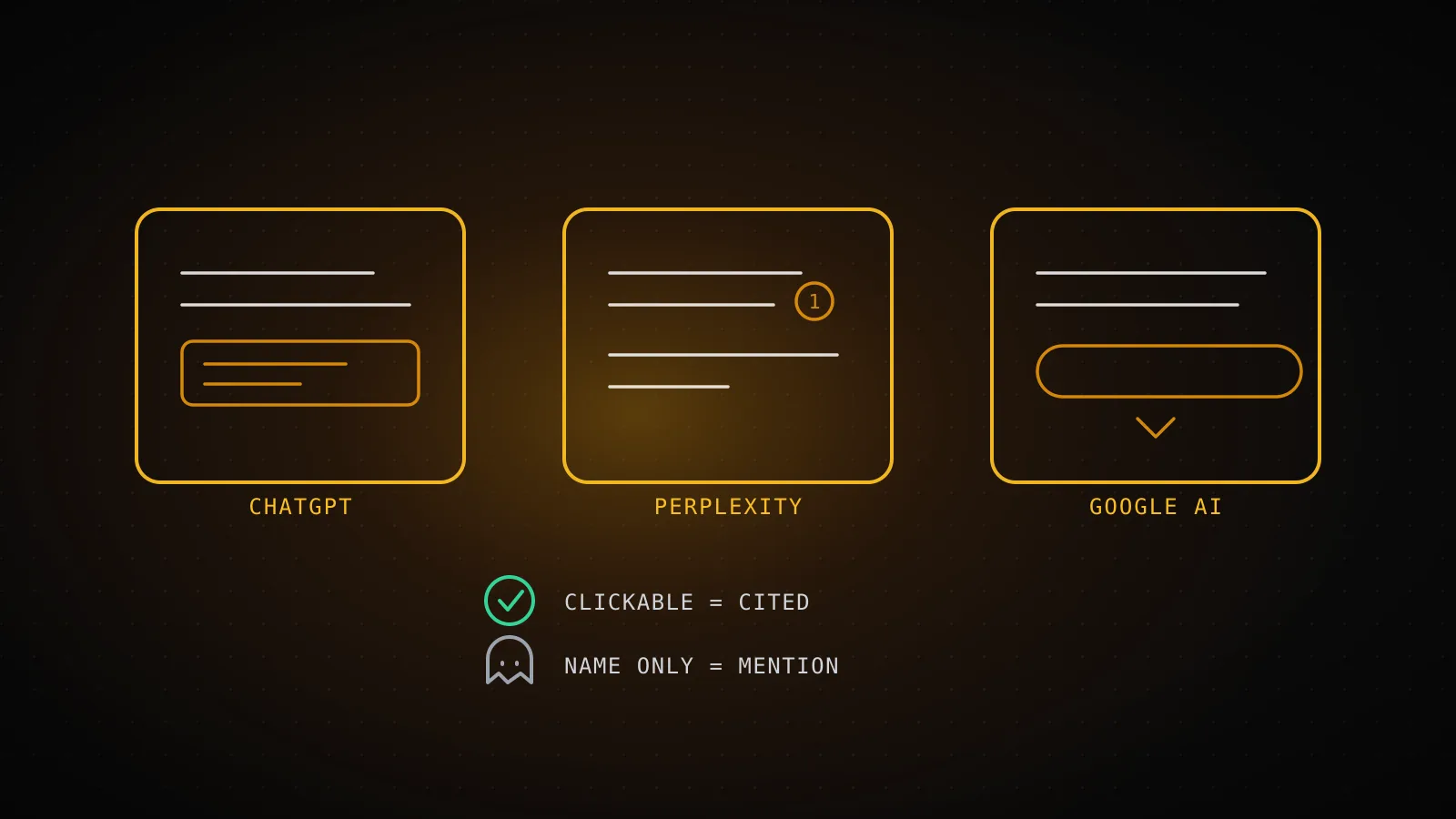
Ask ChatGPT, Perplexity, or Google's AI Overview a question your page answers, and you get back one of three things: a citation you can click straight to your URL, your brand or a stat attributed to you with nothing to click, or no mention of your site at all. Only the first one is a citation. Each engine surfaces it through a different UI element - a source card, a numbered footnote, an expandable sources chip - so checking "am I being cited" only works if you know which element to look at in each one, not just whether your name shows up in the paragraph.
TL;DR - ChatGPT shows a source card only on responses with a visible browsing indicator; Perplexity threads a bracketed footnote number through nearly every answer by default; Google's AI Overview and Gemini attach a small linked card to a source strip under the summary. In all three, a model can also name your brand from memory with none of that attached - a hallucinated mention, not a citation, and the two look identical if you only scan for your name. DispatchSEO's
get_ai_visibilitylogs the real thing per engine automatically; this project's own numbers, pulled live for this guide: 0 of 15 ChatGPT checks, 0 of 90 Claude checks, 0 of 65 Google AI Overview checks actually cite dispatchseo.com.
What actually counts as a citation
A citation is a specific, clickable attribution: the engine names a source and gives you a way to open it, tied to the sentence it backs. A mention is your brand or a fact about it appearing in the generated text with nothing attached to click - the engine is talking about you, not citing you. The difference matters because every engine will happily do the second one from training data alone, with no search ever run.
The check itself is simple to state and easy to get wrong: pick a real query someone would actually type - not your brand name, the thing your page answers - run it in each engine, and look at the specific UI element that engine uses for a source, not just the words.
| Engine | Where the citation lives | What to look for | |---|---|---| | ChatGPT | A card or link near the sentence it backs | Only appears when the response shows a search/browsing indicator | | Perplexity | A bracketed footnote number inline | Runs by default - present on nearly every answer, not just when asked | | Google AI Overview / Gemini | A small linked card in a source strip under the summary | Check the full strip, including behind "Show more" |
ChatGPT: where the citation shows up (and where a mention hides)
When ChatGPT runs a live web search to answer - visible as a search/browsing indicator on that response - sources that back specific sentences show up as small cards or inline links sitting near the claim they support, sometimes consolidated into a source list at the end of the answer. Click one and it opens the actual page.
The failure mode is that ChatGPT doesn't need to search to answer a question about something it already knows. Ask it about a well-known product or company and it can describe it accurately from training data, complete with your brand name, with no search indicator anywhere on the response and no card attached to anything. That's a mention, not a citation - there was no lookup, so there's nothing confirming your current page said what the answer claims.
ChatGPT
Counts as cited
A small source card or inline link sits right under the sentence it backs, and only appears on a response that actually shows the browsing/search indicator.
Doesn't count
Your brand named from memory, with no search indicator anywhere on that response and no card attached - a well-known product gets described without ChatGPT ever looking it up.
Perplexity
Counts as cited
A bracketed number sits immediately after the sentence, on essentially every answer - Perplexity runs a search by default, so this isn't a mode you have to turn on.
Doesn't count
Your brand named in a sentence with no bracket sitting next to it. No number nearby means that clause wasn't sourced from your page, whoever it's talking about.
Google AI Overview / Gemini
Counts as cited
Your URL shows up as one of the small linked cards under the generated summary, including inside the expanded list behind a "Show more" control.
Doesn't count
Your brand or product described in the summary paragraph with no matching card in that source strip once you expand it.
Perplexity: numbered footnotes, visible without asking
Perplexity is the one engine here where the by-hand check doesn't require guessing whether a search ran - it runs a search for essentially every query by default, and threads bracketed footnote numbers through the answer as it writes it. Ask your target query, then read the paragraphs looking for the bracket sitting immediately after the sentence that matches your content. Click through - the footnote list maps each number to a URL, and that URL either is or isn't yours.
The same gap still applies here: a sentence naming your brand with no bracket next to it wasn't sourced from your page, whoever else it might be describing. Perplexity's citations are more visible than ChatGPT's by default, not more reliable - a bracket a few sentences away from your mention is backing a different claim, not yours.
Google AI Overview and Gemini: the sources chip
Google's AI Overview generates a summary and attaches a strip of small linked cards underneath it - sometimes a short visible row, sometimes collapsed behind a "Show more" control that expands to the full list Google actually pulled from. Gemini's search-grounded answers use the same shape: a generated response with a source list attached, not woven into inline brackets the way Perplexity's is.
Run your target query, wait for the AI Overview to render, and expand that strip fully before deciding anything - a source sitting behind the fold is still a citation, and a lot of by-hand checks miss it because they only look at what's visible without clicking expand. Your URL has to appear as one of those cards. Your product being described accurately in the summary paragraph above the strip doesn't count if it isn't also in the strip.
Telling a real citation from a hallucinated mention
This is the part the by-hand method usually skips, and it's a different failure than simply "not cited": a model can generate a confident, specific-sounding claim - a stat, a quote, a "according to [you]" - with no citation element attached anywhere in the response. Read quickly and it looks like a hit. It isn't one, and the tell is different per engine.
A real citation
There's a URL underneath it, not just a name
click the card, the bracket, or the chip and it opens your domain. If nothing on the page is clickable back to you, nothing is confirmed yet.
It sits next to the specific claim it backs
engines attach a source to the sentence it came from, not to the answer in general - a citation two paragraphs from where you're mentioned is probably backing someone else's claim.
It survived a second, independent ask
re-run the same query in a new session. A citation that was really pulled from a live search tends to hold up; a one-off name-drop is more likely to vanish on the next answer.
A hallucinated mention
Your brand named from training data, not a lookup
a well-known product gets described accurately from memory - no search indicator, no source card, nothing fetched, just recall.
A stat or quote attributed to you with nothing behind it
the model can write "according to [you]" and generate a plausible-sounding number with no citation element carrying it - the attribution is prose, not a source.
Confident wording, no matching UI element
no browsing indicator on ChatGPT, no bracket on Perplexity, no card in the AI Overview's source strip - the engine-specific signal from the section above is simply absent.
This is the same problem a student runs into checking whether an AI-generated citation in a research answer is real or fabricated before using it - the fix is identical: click it, don't read it. A name with nothing underneath it is not evidence you were cited, no matter how accurately the engine described you.
Logging it so this isn't a one-time check
A single run through the three engines tells you today's answer to today's query, not a trend. Keep a running log instead: 8-10 real target queries (what a buyer types, not your brand name), the date, the engine, and whether the specific UI element from above was present and pointed at your URL - plus which domain got cited instead when yours didn't. That last column is worth keeping even when the answer is no; it's a shortlist of who's winning the query, not just a miss.
Repeat monthly. A citation rate from one check is a snapshot; it only becomes a trend once there's a second data point sitting next to the first, checked the same way.
Automating the check instead of doing it by hand every month
DispatchSEO's get_ai_visibility and record_ai_citations MCP tools do exactly the log above, on a schedule, without a spreadsheet that stops getting updated after month two. record_ai_citations writes one row per engine/query/date: whether an answer ran, whether it cited this site, and every source it cited instead. get_ai_visibility reads that back. Here's what it actually returned, called live while writing this guide - the real shape, not a description of it:
{
  "engines": [
    { "engine": "chatgpt", "checked": 15, "ai_answers": 15, "cited": 0, "cited_pct": 0 },
    { "engine": "claude", "checked": 90, "ai_answers": 90, "cited": 0, "cited_pct": 0 },
    { "engine": "google_ai_overview", "checked": 65, "ai_answers": 64, "cited": 0, "cited_pct": 0 }
  ],
  "gap_domains": [
    { "domain": "youtube.com", "count": 64 },
    { "domain": "code.claude.com", "count": 35 },
    { "domain": "github.com", "count": 33 }
  ]
}
get_ai_visibility - called live for this guide, 2026-09-08
ChatGPT
0 / 15
checked, 15 got an AI answer - 0 cited dispatchseo.com
Claude
0 / 90
checked over 90 runs since late July - still 0 cited
Google AI Overview
0 / 65
64 of 65 checks returned an overview; 0 named this domain
These are the only three engines this project's own history holds data for right now - Perplexity and Gemini aren't in a `record_ai_citations` row yet, which is an honest gap, not a claim the tool can't log them.
cited_pct at zero across the board isn't a broken pipeline - ai_answers confirms the engines are answering fine on almost every check, this domain just hasn't accumulated the backlinks and age that make a model reach for it as a source yet. The gap_domains list is the useful part regardless of your own number: it's exactly who's getting cited instead on these queries, which is a targeting list, not a scoreboard.
When this isn't worth automating yet. A one-off check before a launch, or a site with two target queries total, gets nothing from wiring up a second tool - do it by hand once and move on. The automation pays off once you're repeating the same 8-10 queries monthly and the spreadsheet is the thing that's actually at risk of lapsing, same as it does for AI-visibility tracking generally.
FAQ
Does ChatGPT show a citation every time it mentions a brand? No. ChatGPT only attaches a source card when the response actually ran a search, visible as a browsing indicator on that answer - it can also describe a well-known brand accurately from training data with no search and no card at all.
Why does Perplexity show citations more often than ChatGPT? Perplexity runs a search for essentially every query by default and threads a bracketed footnote number through the answer as standard behavior, not an opt-in mode. ChatGPT only shows its source cards on responses where browsing actually happened.
Is a brand mention in an AI answer worth anything if it's not a citation?
It means the model has enough training data or reputation signal to describe you accurately, which is a real (if unmeasurable) form of awareness - but it isn't verifiable, isn't dated, and won't show up in get_ai_visibility's cited count, which only counts an attached, clickable source.
Can I check this without any paid tool? Yes - running your target queries by hand through each engine and logging what you see costs nothing but the repetition. The tactics most likely to move the number in the first place are also free; DispatchSEO's automation buys you the repeatability, not the check itself.
What does it mean if has_ai_answer is true but I'm never cited?
It means the pipeline and the engine are both working - the engine is answering your target queries, just not from your domain yet. That's usually a cold-start or authority gap, not a broken setup; a freshly updated page can close some of that gap faster than a brand-new one.
Does DispatchSEO track Perplexity and Gemini citations too?
The tools support logging any engine you check by hand through record_ai_citations; this project's own history so far only holds ChatGPT, Claude, and Google AI Overview rows, which is why the live numbers above only cover three engines.
Three engines, three different citation elements, and one failure mode - a confident mention with nothing clickable underneath it - that looks the same as a hit in all three if you only read the words. Check the actual element, not the name, and if you're going to repeat the check monthly anyway, log it somewhere that survives past the second month.