Google Search Console MCP - what it actually gives your agent (and what it doesn't)
8 min read
On this page
A Google Search Console MCP server exposes GSC's Search Analytics API - queries, pages, clicks, impressions, position - to an LLM client as callable tools, so an agent can pull search performance data mid-session instead of a person opening the Search Console UI. Every public example of one right now does exactly that and stops: it reads the numbers back, and a human still decides what to do with them. The distinction worth knowing before you wire one up is whether you're adding a reporting surface or a decision-making one, because those are different builds, and most "Google Search Console MCP" results answer the first question, not the second.
TL;DR - a GSC MCP server is a thin wrapper around one Google API (Search Analytics: clicks, impressions, CTR, position, grouped by query/page/date/device/country). Every public one on page 1 right now reads that data back to a chat window; none of them decide anything with it. DispatchSEO's own
get_site_statsandget_overviewtools expose the same API, but feed a suggestions queue instead of a transcript - this project's own 27-day feed (4,098 impressions, 0 clicks, on a 25-day-old domain) is the live example below.
What a "Google Search Console MCP" server actually is
MCP is an open standard for connecting an AI client to external tools over a fixed protocol, instead of every integration inventing its own function-calling shape. A "Google Search Console MCP" server sits between an LLM client and Google's Search Analytics API and exposes one job: query it. That API takes a mandatory date range (Pacific Time), groups results by up to a handful of dimensions - country, device, page, query, searchAppearance, date, hour - and returns clicks, impressions, CTR, and average position per row, sorted by clicks unless you group by date. It needs one of two OAuth scopes, webmasters.readonly or the read-write webmasters, and returns at most 25,000 rows (1,000 by default) - Search Console's own limit, not the API client's. That's the entire surface. A GSC MCP server is a thin translation layer over it, nothing more, and knowing that scope going in is most of what you need to evaluate any implementation of one.
The field right now: one shape, eight results
github.com
AminForou/mcp-gsc: Google Search Console Insights
suganthan.com
Google Search Console MCP: Step by Step Setup Guide
reddit.com
I built an MCP server for Google Search Console so AI can...
mcpservers.org
Google Search Console MCP Server
mcpmarket.com
Google Search Console MCP: Analyze Search Data
ekamoira.com
Google Search Console MCP Servers Compared
windsor.ai
Google Search Console MCP: Claude, ChatGPT & More
openseo.so
No Google Cloud Setup - Search Console MCP
Pulled live off page 1 for this exact query: an open-source repo, a personal setup guide, a comparison roundup, a Reddit build-in-public thread, two MCP directory listings, and two SaaS data-connector platforms that added GSC as one source among many. Every one of them answers "how do I read Search Console from my AI client" - none of them answer "what does the client do with the answer." That's not a knock on any of them; a reporting tool doesn't need to do more than report. It's just the field, and it's a genuinely open one: no established SEO brand or GSC-specific product owns this query yet.
Where the read-only model hits its ceiling
A reporting MCP server turns "check Search Console" into a tool call instead of a tab switch. That's a real, useful compression - but the agent still has to be told to make the call, still has to be told what a good or bad number looks like, and still hands the finding back to a person who decides whether it's worth acting on. Ask a bare GSC MCP "did anything change this week" and it can answer with numbers; ask it "what should I write next" and there's nothing downstream of the API response to answer that with. The gap isn't missing data - it's a missing decision layer sitting on top of the same data every one of these servers already exposes.
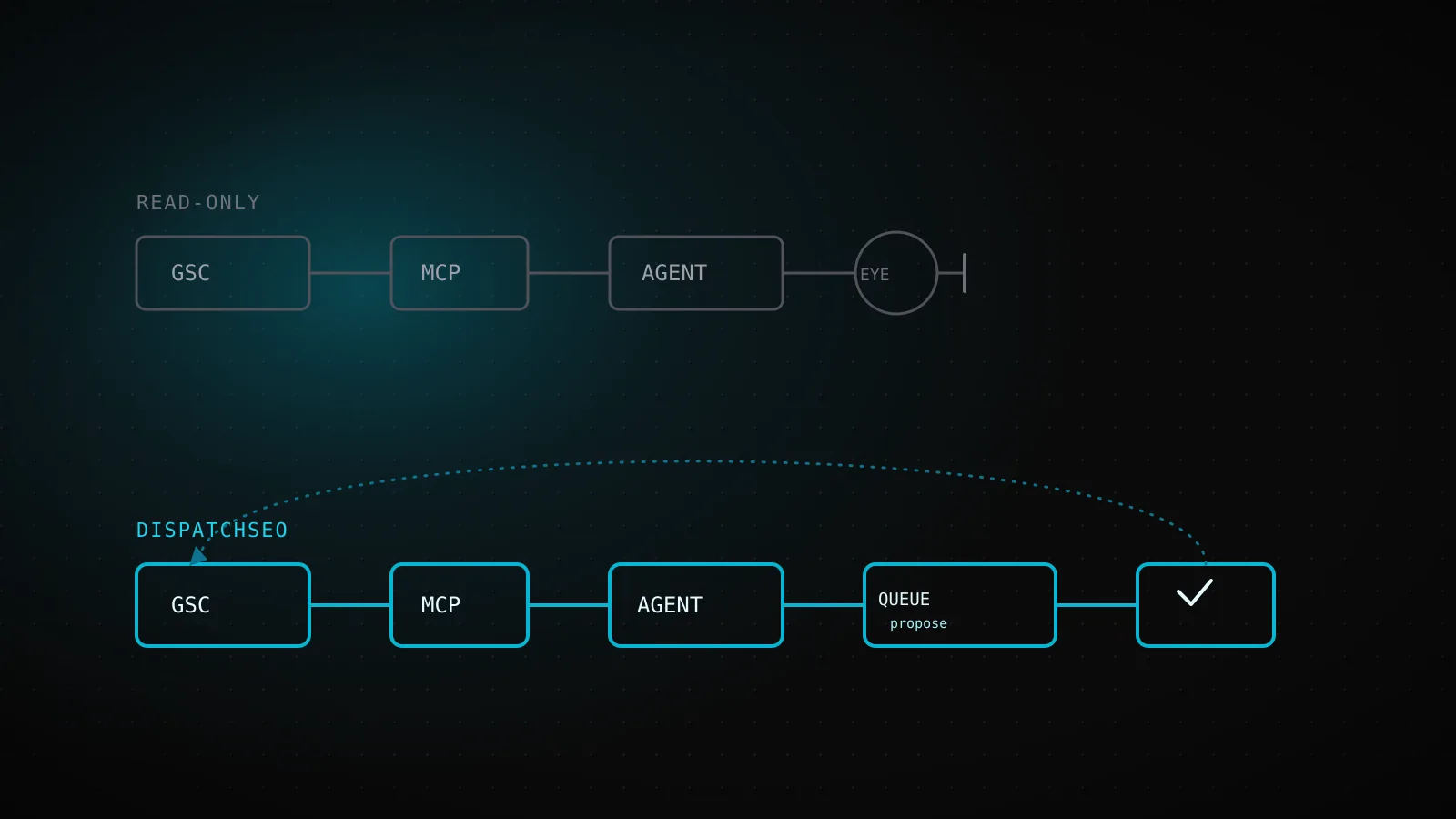
Inside a suggestions loop: GSC data as an input, not an output
Every public GSC MCP server - reads, then stops
GSC Search Analytics API
clicks, impressions, CTR, position - queried by an MCP tool call
Answer lands in the chat
the numbers reach the person asking, formatted as a reply
A person reads it
and decides, by hand, whether anything is worth doing about it
Nothing persists
ask again tomorrow and the same read happens from zero
DispatchSEO's MCP - reads, then closes the loop
get_site_stats + get_overview
same Search Analytics data, joined to rank history and the build queue
Nightly stale-page detector
flags a published guide sitting at position 5-20 for its own keyword
propose_suggestion -> update_suggestion
the gap becomes a queued decision, not a number in a transcript
A page ships or an existing one gets refreshed
and the next GSC pull checks whether it worked
DispatchSEO's own MCP wraps the same Search Analytics API - get_site_stats returns daily GSC snapshots and a trend summary, get_overview folds it into the dashboard's whole picture alongside rank history and the build queue - but neither one is the last stop. This build's own operating instructions carry a dedicated mode for it: a nightly detector flags any published guide sitting at position 5 through 20 for its own primary keyword, and the next build's job changes from writing a new page to closing the gap list on the one that's already ranking. Impressions and position aren't a chart here; they're an input propose_suggestion and update_suggestion read before a page gets written at all.
This project's own Search Console feed, 27 days in
dispatchseo.com, get_site_stats, 27-day window - 25 days into indexing
Impressions
4,098
Clicks
0
Window
27d
Pulled live from this project's own Search Console property, the same feed a bare GSC MCP server would return for any query. Impressions arrive before clicks do on every new domain - a decision layer that only acts once clicks show up would have nothing to work with for the first month.
Zero clicks isn't a failure state to hide - it's the honest state of a 25-day-old domain, and it's exactly the case a reporting-only MCP server has nothing useful to say about. Impressions arrive before clicks do, every time, on every new domain; a decision layer that only acts once clicks show up is a decision layer that does nothing for the first month. The 4,098 impressions above are what this project's own research and build workflows are already reading - which queries are showing up, at what position - well before there's a click count worth reporting on.
Wiring one up: the service-account steps that actually matter
Enable the Search Console API
In Google Cloud Console, on the project you'll authenticate from: APIs & Services -> Library -> Search Console API -> Enable. Skipping this is the single most common reason a fresh GSC MCP server returns an auth error on its first call.
Create a service account and download its JSON key
IAM & Admin -> Service Accounts -> Create. No interactive OAuth consent screen, no refresh-token dance for a headless or scheduled caller - this is also how DispatchSEO's own crons authenticate, via a GSC_SERVICE_ACCOUNT_JSON env var instead of a browser login.
Add that service account as a Search Console user
In Search Console: Settings -> Users and permissions -> Add user, using the service account's email address. "Restricted" access is enough for read-only reporting; nothing here needs "Full" or "Owner."
Pick the narrower OAuth scope on purpose
webmasters.readonly covers every reporting use case - Search Analytics queries, sitemap status. Only reach for the read-write webmasters scope if the server also submits sitemaps or otherwise writes back, which almost none of the field above does.
What a bare GSC MCP still leaves you to build
A reporting server hands you rows; it doesn't hand you a threshold for "this is worth a page" or a place to put that decision once it's made. Everything past the API call is still yours to build: a rule for what counts as an opportunity (high impressions, weak position or CTR), somewhere to persist that a query has already been acted on so the same one doesn't get proposed twice, and a way to actually ship something - a draft, a PR, a page - once the decision is made. That's the entire other half of what a suggestions queue and a build pipeline are for; a GSC MCP server alone gets you the read, not the loop.
When a reporting-only server is exactly what you want
None of this makes the read-only shape wrong - it makes it scoped. Ask an assistant "how did last week look" inside a chat session, once, with no state to persist and no downstream action to trigger, and a thin reporting wrapper is the right amount of engineering: no queue, no cron, no infrastructure to run unattended. The decision-loop shape only earns its complexity when something is meant to act on the numbers without a person re-asking the question every time.
FAQ
What does "Google Search Console MCP" mean? An MCP server that exposes GSC's Search Analytics API - clicks, impressions, CTR, and position, grouped by query, page, date, device, or country - to an AI client as callable tools, instead of a person reading the Search Console UI by hand.
Which OAuth scope does a GSC MCP server need?
https://www.googleapis.com/auth/webmasters.readonly for reporting-only use, which covers everything the field surveyed above does. The read-write webmasters scope is only needed if the server also submits sitemaps or writes back to the property.
Can an LLM take actions in Search Console through one of these, or only read? Every public GSC MCP server on page 1 for this query is read-only: it answers questions about existing data. None of them submit sitemaps, request indexing, or change property settings - that's a different, much smaller slice of the API that none currently expose.
Does DispatchSEO replace a standalone GSC MCP server?
For reporting, yes - get_site_stats and get_overview cover the same Search Analytics data. The difference is what happens after: those calls feed a suggestions queue and a nightly stale-page detector instead of ending at a chat response, which is the whole point of running it as part of a content pipeline rather than a standalone lookup tool.
Do I need a Google Cloud project to use any Google Search Console MCP server? Yes. Every path to the Search Analytics API - service account or interactive OAuth - starts with a Google Cloud project that has the Search Console API enabled; there's no way to query GSC data without one.
A "Google Search Console MCP" search mostly turns up the same answer restated five ways: a server that reads Search Analytics data into an AI client. That's a real, small, useful thing, and worth building or installing exactly as-is if a chat-session lookup is the whole job. Where the search stops short is the other question - what turns "impressions are up, clicks aren't" into a page that gets written - and that's a decision layer sitting on top of the same API, not a different one. This project's own rank-tracking and Search Console loop is one example of what that layer looks like once it's wired all the way to a shipped page, and the same query data underneath shows up again in miniature in the keyword cannibalization checker - a live pull, not a screenshot.