Claude Code background tasks: are they safe for a truly unattended run?
8 min read
On this page
Claude Code's background tasks let a session keep running with the terminal closed, but closing the terminal isn't the same guarantee as a job surviving a machine reboot - and that gap is exactly what decides whether background tasks can carry work nobody is watching.
TL;DR -
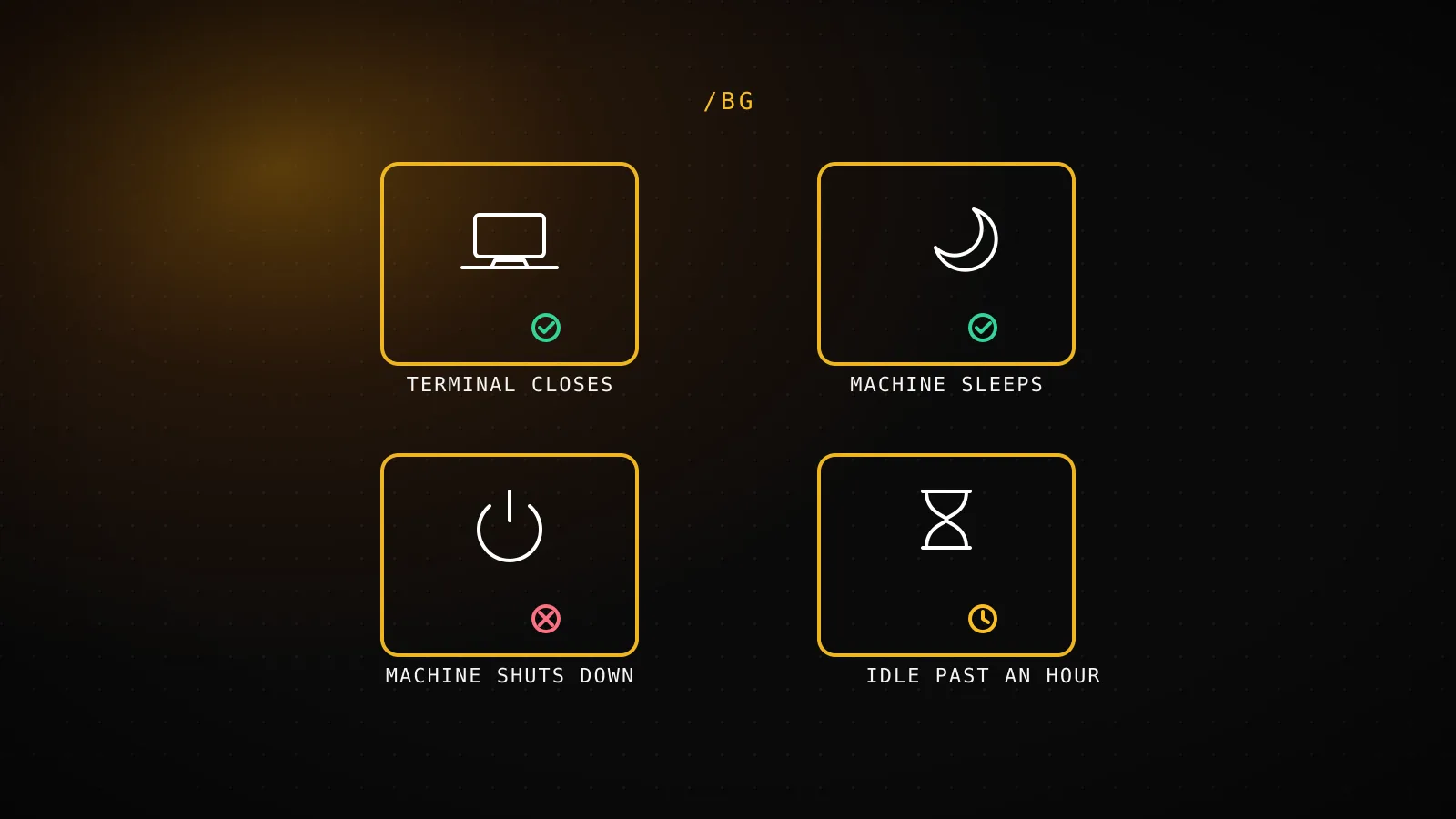
/bg(alias/background) detaches the current session to a local supervisor process, which keeps it running through a closed terminal or a sleeping machine. It does not survive a shutdown: powering off stops every running session, full stop. An idle background task also has its process freed after about an hour unattended to save resources - the conversation isn't lost, but it isn't actively working either until you reattach. For a job that has to survive a reboot, retry itself, or run tighter than once an hour, that's a Claude Code routine or a real external cron, not a background task.
What /bg and the background tasks panel actually do
/bg, short for /background, detaches the current session so it keeps running as a background agent and frees the terminal you were in - optionally taking one last instruction before it detaches. /tasks lists the current session's background work, including subagents that have finished, and claude agents opens the fuller agent view to monitor and reattach. Three related commands cover the rest of parallel work: /fork copies the conversation into a new background session while the current one keeps going, /subtask hands a bounded side job to a subagent whose result comes back into the conversation, and /batch decomposes a larger change into independent units, one background subagent per unit in its own git worktree.
What actually makes any of this keep running without a terminal attached is a separate supervisor process - a background service Claude Code starts the first time you background a session or open agent view. The session itself is a full Claude Code conversation; the supervisor is what keeps its process alive after you've walked away, and what your machine has to still be running for.
What survives a laptop sleeping, closing, or shutting down
That supervisor detail is the whole answer to "is this safe for something unattended," so it's worth testing state by state rather than assuming closing your laptop lid behaves like leaving a server running:
Terminal or shell closes
Keeps running
A local supervisor process holds the session open with no terminal attached - this is the case /bg is built for.
Machine goes to sleep
Resumes on wake
The docs are explicit that the sleep gap isn't treated as idle time - the process picks back up when the machine does.
Machine shuts down
Stops running
Shutting down stops every running session. It shows as failed for up to 48 hours, then stopped - both resumable by attaching, neither still executing.
Unattended for about an hour
Process stops, conversation doesn't
The supervisor frees the process to save resources, but the session isn't deleted - it resumes where it left off on your next reply, or stays running if pinned with Ctrl+T.
The load-bearing line is the shutdown row. Sleep is fine - the docs are explicit that the time asleep isn't counted as idle, so the process resumes on wake as if nothing happened. Closing the terminal is the entire point of /bg and works exactly as advertised. But powering the machine off stops every background session on it, and there's no retry: it shows as failed for the first 48 hours, then as stopped with an "ended while the background service was off" message, and either state needs you to come back and press Enter to pick it up. A background task assumes the machine keeps running - it doesn't assume anyone's watching it, but "unattended" and "the laptop can be closed and it'll still be fine" are not the same claim.
The 30-minute failure people keep hitting, and what's actually behind it
Live search results for this exact query surface a real, specific pain point - "Claude Code Background Task Dies at 30 Minutes?" - and the mechanism above explains why that report exists even though the documented idle-process timeout is closer to an hour: sleep, network changes, laptop lid state, and OS power management can all interrupt a supervised process well before the supervisor's own clock would have freed it on purpose. The visible symptom is the same either way - a background task that looks alive in the panel but has stopped producing output - which is why the fix is the same either way too: reattach (claude attach <id> or claude --resume <id>) and check whether the session actually finished, stalled waiting on input, or was killed by something outside Claude Code's own idle-timeout logic. A task you can't afford to lose to an unplanned interruption is a task that shouldn't depend on being backgrounded on a machine you don't fully control the power state of.
Background tasks vs a routine vs a real external cron
Three different things all get called "running Claude Code unattended," and only one of them is actually infrastructure you own:
- 1
Stepping away mid-task, this once
A background task (/bg) - your machine stays on, the supervisor holds the session, you reattach when it's done
- 2
Recurring, no tighter than hourly, nothing to host
A Claude Code routine - Anthropic's cloud runs it, capped at 5-25 runs a day by plan, no claude.ai seat means no routine at all
- 3
Sub-hourly, has to survive a reboot, needs retries or persisted state
A real external cron - Vercel's crons field or a GitHub Actions schedule: trigger, infrastructure you own and can retry yourself
A background task and a Claude Code routine both trade infrastructure for a ceiling: a background task needs your machine to stay powered on, a routine needs a claude.ai seat and tops out at 5-25 runs a day with no interval tighter than an hour. A real cron job - a Vercel crons entry, a GitHub Actions schedule: trigger - is the only one of the three with no platform-imposed ceiling, because it's the only one that isn't riding on top of a session Anthropic or your own laptop has to keep alive. The same question shows up one layer up the stack, too: a Claude Code subagent makes one call inside a session more reliable the same way a real cron makes a whole schedule more reliable - by moving the guarantee off "the model chose to do this right" and onto something that runs regardless.
How DispatchSEO's own crons solve the exact problem background tasks can't
This site is itself a DispatchSEO deployment, and its own scheduling is a working example of what "carries a job when nobody's watching" actually takes once you're past a single background task. Every cron loops every connected project inside Promise.allSettled, so one site's failure never stops the others from completing, and every route returns HTTP 500 the moment anything failed rather than exiting quietly green - the failure has to be visible in the run log, not just survivable:
One project's cron failing
Never kills the run
Every cron loops all projects inside Promise.allSettled, so one site's failure can't stop the rest from completing
Any failure, anywhere in the loop
HTTP 500
Every cron route returns 500 if anything failed, so it shows up in Vercel's own run log instead of exiting quietly green
Every run, pass or fail
Logged + alerted
reportCronRun() writes to cron_runs; failures hit the dashboard's Home banner and a Resend email, debounced per job
Anything tighter than once a day
GitHub Actions
Vercel's Hobby tier caps crons at 2 jobs run once daily, so higher-frequency work splits out to scheduled workflows
None of that is a background-task feature, and it isn't supposed to be one - a background task is scoped to a session someone actively dispatched, not a recurring job with its own alerting and retry story. It's the shape a task graduates into once "reattach it if it stops" isn't an acceptable failure mode anymore.
So can a background task carry a truly unattended run
For the thing /bg is actually built for - stepping away from a task you started, on a machine you're going to leave running - yes, and the supervisor process genuinely does what the panel implies: no terminal needed, sleep doesn't interrupt it, reattaching from another shell or claude --resume picks the conversation back up. What it isn't is a scheduler. It doesn't survive a shutdown, it has no daily cadence of its own, and nothing about it retries a run that failed or persists state between separate invocations the way a real cron job's own backing store does. Route the "watch this while I'm away" work to /bg, and route "this has to run at 4am whether or not any machine of mine is on" to a routine or a cron job built for that job specifically - conflating the two is exactly how a background task's normal power-off gets reported as a mysterious failure the next morning. It's the same distinction that decides which coding agent to trust with an unattended run in the first place: the tool matters less than whether the thing carrying the job was ever built to survive nobody watching it.
FAQ
Does /bg work the same way on a remote or cloud-hosted Claude Code session?
The supervisor process and its power-state behavior are about the machine the session's process actually runs on. On a routed self-hosted or cloud environment, that's the environment's own uptime that matters, not your laptop's - the reattach mechanics (claude attach, claude --resume, agent view) work the same regardless of where the process lives.
Can I pin a background task so it never gets frozen for being idle?
Yes - Ctrl+T pins a session to keep its process running indefinitely instead of letting the supervisor free it after about an hour unattended. The conversation was never actually lost either way; pinning only changes whether the process itself stays warm.
Is /fork or /batch a better fit than /bg for running several things at once?
/bg detaches the one session you're in. /fork copies it into a new background session while you keep working in the original, and /batch decomposes one larger change into several independent background subagents, each in its own git worktree - reach for those when the goal is parallel work rather than freeing your terminal from a single task.
If a background task survives sleep, why does a scheduled cron job still matter? Because sleep isn't the failure mode a schedule has to survive. A cron job's job is to fire at a specific time with nobody deciding to start it - a background task only exists because someone already dispatched it from a live session, so it can never be the thing that starts the 4am run in the first place.